
01 / MOVEMENT & LENGTH
Bro Flow
Relaxed, swept-back length
Look for hair that flows away from the face and keeps movement around the ears and nape.
AI-POWERED HAIRCUT IDENTIFIER
Wondering what hairstyle is in a picture? Upload a haircut photo or select a sample image to discover its likely name, distinctive details, and barber-ready instructions.
Drop in a reference image or choose an example below.
or click to upload a haircut reference
Choose photoPhotos are processed for identification, with no saved photo history. Privacy details
Tap any example to identify it automatically using the same AI as your own photos.
A hairstyle is more than its label. An AI haircut identifier examines hair length, shape, layers, fringe direction and how the sides are cut. These five reference styles show the details that matter.
Relaxed, swept-back length
Look for hair that flows away from the face and keeps movement around the ears and nape.
Choppy crown, longer outline
Shorter layers build fullness on top while longer pieces give the style its shaggy shape.
Piecey hair across the forehead
The front falls forward in separated strands; the sides may be tapered or faded.
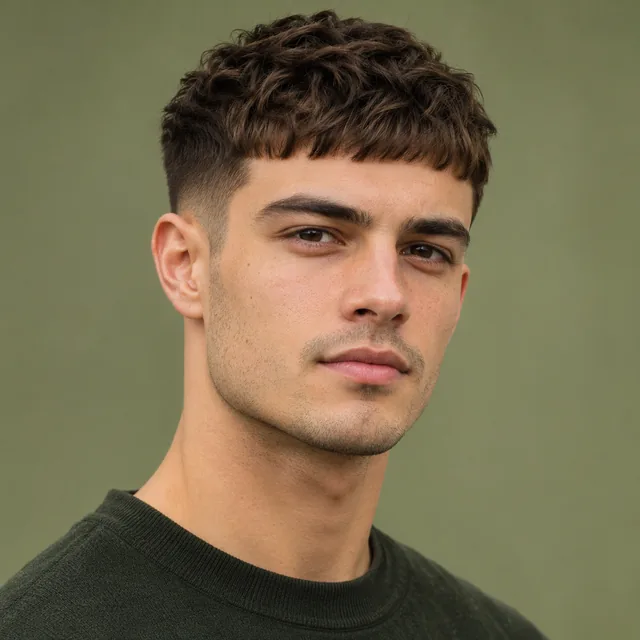
Compact top, short fringe
A cropped front edge and a neat, short silhouette distinguish this style from longer fringes.
Front parted into two sections
Hair opens from the middle or just off-centre, falling to either side of the forehead.
MORE THAN A HAIRCUT NAME
Finding a haircut name from a photo is easier when you compare visible features. Our hairstyle identifier describes the clues that separate similar cuts.
The overall silhouette helps separate a short crop from a bob, lob, mullet or longer layered hairstyle. A photo cannot reveal precise measurements.
A fade has a visible gradient from longer to shorter hair. A taper often concentrates that shortening around the temples, sideburns and neckline.
Layers can create volume around the crown, shape around the face or a softer, textured outline. The direction of the hair may also depend on styling.
A forward fringe, curtain part, side part or swept-back front can distinguish hairstyles with otherwise similar lengths.
Straight, wavy, curly and coily hair can produce different silhouettes. The tool describes visible patterns rather than assuming a person's natural hair type.
Parting patterns, braid placement and arrangement matter when distinguishing cornrows, box braids and other braided looks.
For example, a low taper and a low fade may look similar from the front. The placement and height of the blend often make the difference. Our fade vs. taper guide explains what to check before describing either style.
SIMPLE STEPS
Use the photo haircut identifier to answer “What is this haircut called?” The tool suggests a commonly used name, then helps you understand the shape and describe it clearly.
Upload a JPG, PNG or WebP reference, or try a sample haircut photo. A clear hairline and visible side profile give the hairstyle finder more detail.
The AI hairstyle identifier compares the outline, layers, fringe, texture and any fade or taper. It suggests a likely name and useful alternatives.
Copy the style breakdown and keep your original haircut reference. Confirm your preferred length, sides and finish before the cut.
One image is enough to try. Hidden layers, exact lengths and the back of the head may not be visible, so check the result against the original photo.
PRO TIPS
To identify a hairstyle from a picture, choose a sharp, well-lit reference with the full hair shape visible. A front and side view can help you and your barber check details the camera may hide.
A clear reference can improve identification, but no single photo shows every detail.
A photo-based haircut finder can describe what is visible, but it cannot measure every part of a cut.
A result can still be useful when its name is uncertain. Use the feature descriptions as a checklist and discuss your natural hair pattern, density, daily styling time and preferred upkeep with a professional.
Not sure whether a photo shows a taper fade, textured crop, butterfly cut or layered shag? Browse common men's and women's haircut names and compare their shapes, fringe and parting.
COMMON QUESTIONS
Clear answers before you upload your haircut reference.
Upload a clear haircut photo or select a sample image. The AI haircut name finder suggests a likely style and describes its visible details. Bring the reference picture to your barber, because similar styles can have different names.
AI can often identify a recognizable style from a good reference image, but a single picture may hide the back, layers or actual length. The result is an informed suggestion, not a guarantee of an exact haircut name.
Use the description instead of relying on a label. Tell your barber how long to keep the top, where to blend the sides, how the fringe should fall and what shape you want at the back.
Yes. You can use a clear screenshot or a haircut reference image that you have permission to upload. Avoid blurry images, heavy filters and photos where most of the hair is hidden.
No. Upload a hairstyle reference, a photograph you have permission to use, or try the three example haircuts. You do not need to photograph your own face or create an account.
Yes. The tool focuses on visible style features rather than gender. It can describe many fades, crops, shags, bobs, pixies, layered haircuts and braided styles, although results depend on photo quality.
The website does not create a public photo gallery or personal history. Photos are sent to a third-party AI provider for identification. Review the Privacy Policy for information about processing and provider retention.
HAVE A REFERENCE PHOTO?